
-

Add to Cart Honor
Honor x Pop Mart Honor 500 Pro Molly 20 Year Anniversary Limited Edition SmartphoneThe Honor 500 Pro MOLLY 20th Anniversary Limited Edition celebrates two decades of POP MART's MOLLY. It is Honor and POP MART's first fully customized co-branded phone, with MOLLY's classic "Little...CAD$1,281.23 -

RedMagic
RedMagic x Wuthering Waves Chisa Limited Edition SmartphoneRedMagic 11 Pro+ Wuthering Waves (Chisa Edition) Limited Phone This special edition RedMagic phone is a deep collaboration with the character Chisa from Wuthering Waves, offering a comprehensive and...FromCAD$1,840.98 -
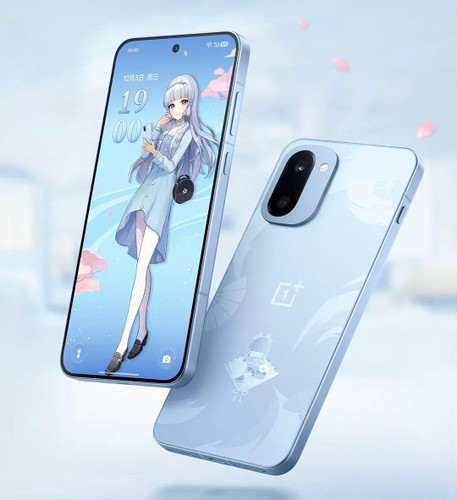
Choose Options Oneplus
OnePlus Ace 6T x Genshin Impact Kamisato Ayaka Special Edition Smartphone Gift BoxThe OnePlus Ace 6T Genshin Impact Kamisato Ayaka Special Edition is a custom 16GB + 512GB Genshin Impact phone in an exclusive "Snowy Blue" color. Its glass back is engraved with Ayaka's mark, a...FromCAD$1,358.58 -

Choose Options RedMagic
RedMagic 10S Pro x Wuthering Waves Camellya Limited Edition SmartphoneThe RedMagic 10S Pro × Wuthering Waves Camellya Limited Edition is a gaming phone built around Camellya from Wuthering Waves, officially licensed by Kuro Games. Its matte back fades from black to...FromCAD$1,563.92 -

Choose Options Redmi
Xiaomi Redmi Turbo 4 Pro x Harry Potter Special Edition SmartphoneThe Redmi Turbo 4 Pro × Harry Potter Special Edition is a Harry Potter phone made for fans of the Wizarding World, officially licensed by Warner Bros. Its back is split diagonally: the upper black...FromCAD$690.54 -
Sale

Choose Options Oneplus
Oneplus Ace3 Pro x Genshin Impact Kirara Special Edition Smartphone Gift BoxThe OnePlus Ace 3 Pro × Genshin Impact Kirara Special Edition Gift Box pairs the OnePlus Ace 3 Pro with a Kirara gift package, themed after the cheerful Inazuma courier of Komaniya Express. It is a...FromCAD$1,026.67 -

Xiaomi
Xiaomi CiVi 4 Pro x Disney Princess Limited Edition SmartphoneXiaomi once again showcases its unique creativity with collaborative limited editions with the newly released Xiaomi Civi 4 Pro Disney Princess Edition. This device is not just a phone but a work of...CAD$963.38 -

Choose Options RedMagic
Nubia RedMagic 9 Pro+ x Transformers Bumblebee Edition SmartphoneThe RedMagic 9 Pro+ × Transformers Bumblebee Edition is a Transformers phone built for elite mobile gaming. Its yellow back runs a long black stripe with the Autobot insignia and BUMBLEBEE lettering...FromCAD$1,112.46 -

Choose Options Redmi
Xiaomi Redmi Turbo 3 x Harry Potter Special Edition SmartphoneThe Xiaomi Redmi Turbo 3 × Harry Potter Special Edition is a Harry Potter phone made for fans of the Wizarding World. Its two-tone back pairs a brushed champagne-gold panel, with a platinum-relief...FromCAD$728.52 -

Choose Options Oneplus
OnePlus Ace 3 x Genshin Impact Keqing Special Edition Smartphone Gift BoxThe OnePlus Ace 3 × Genshin Impact Keqing Special Edition Gift Box is a Genshin Impact phone for fans of the Yuheng of the Liyue Qixing. Its purple silk-glass back is etched with Keqing's peacock...FromCAD$1,149.03 -

Choose Options RedMagic
Nubia RedMagic 8S Pro+ Transformers Bumblebee Limited Edition SmartphoneThe Nubia RedMagic 8S Pro+ Transformers Bumblebee Limited Edition is a gaming phone in Bumblebee yellow, with RedMagic's transparent back, BUMBLEBEE lettering, a purple-lit Autobot logo and...FromCAD$915.57 -

Oneplus
OnePlus Ace 2 Pro x Genshin Impact Paimon Special Edition Smartphone Gift BoxThe OnePlus Ace 2 Pro × Genshin Impact Paimon Special Edition Gift Box is a Genshin Impact phone made for every Traveler who wants Paimon along for the journey. The Titanium Gray phone comes with a...CAD$1,012.61
FAQs about Smartphones...
A smartphone is more than just a calling device—it’s your camera, gaming console, and productivity tool. Here are the most important features to check before buying:
- Performance (Processor & RAM): A powerful chipset (Snapdragon, Apple A-series, MediaTek Dimensity) and enough RAM (8GB–12GB for smooth multitasking) ensure fast performance.
- Display: Look for AMOLED or OLED screens with high refresh rates (90Hz–144Hz) for vibrant colors and smooth visuals.
- Camera System: Multiple lenses (wide, ultra-wide, telephoto, macro) and features like night mode, optical zoom, and 4K/8K video recording are essential for photography lovers.
- Battery Life & Charging: Bigger batteries (4500mAh–6000mAh) and fast charging (wired 65W+, wireless charging, or reverse charging) improve daily convenience.
- Operating System & Updates: Ensure the phone has the latest Android or iOS version with promised security and software updates.
- Storage: Choose at least 128GB for modern use, with expandable microSD options or cloud storage if needed.
- Connectivity: Features like 5G, Wi-Fi 6/6E, NFC (for mobile payments), and dual SIM are increasingly important.
- Durability: Water and dust resistance (IP68 rating) and toughened glass like Gorilla Glass protect against accidents.
- Design & Build: Slim profiles, curved edges, and premium materials (glass, metal) enhance both look and comfort.
The right smartphone depends on your priorities—gaming, photography, work, or daily use. Always balance performance, battery life, and features with your budget.
Chinese version smartphones often differ from global versions in software and network compatibility. The hardware is usually identical, but the system firmware (such as MIUI and ColorOS) may lack Google Mobile Services (GMS) and come with pre-installed regional apps. Additionally, some network bands used in other regions may not be fully supported, affecting 4G or 5G coverage in certain countries.
Common differences include:
- Language and regional settings limited to Chinese defaults
- Missing Google Play Store and related apps
- Localized apps or ads not relevant to international users
- Different charging adapters or power standards
How to fix these issues:
- Install Google Play Store manually or flash the Global ROM (if available) using the manufacturer’s official tools
- Use third-party launchers to remove regional UI clutter
- Check your carrier’s supported bands before purchase to ensure full connectivity
- Switch language settings to English and disable region-locked features
In short, Chinese version smartphones can offer great value, but users should be prepared for some setup work to achieve a smooth, global experience.
Before buying a smartphone—especially an imported or unlocked one—it’s essential to make sure it supports your country’s network bands and carrier. Here’s how you can verify compatibility, using Verizon as an example:
- 1. Check Network Bands: Every carrier uses specific frequency bands (for 4G LTE and 5G). Visit the phone’s official specs page and confirm it supports Verizon’s main bands:
- 4G LTE: Bands 2, 4, 5, 13, 66
- 5G: Bands n2, n5, n66, n77, n260, n261
- 2. Verify IMEI on Verizon’s Website: Go to Verizon’s Bring Your Own Device (BYOD) checker and enter your phone’s IMEI number. It will tell you if the phone is compatible.
- 3. Check Carrier Lock: Make sure the phone is factory unlocked. Locked phones only work on the carrier they were sold for.
- 4. Consider Regional Variants: Some brands (like Samsung or Xiaomi) release different models for Asia, Europe, and the U.S. — only the U.S. versions are guaranteed to work perfectly with Verizon.
- 5. Verify VoLTE/5G Support: Even if bands match, check if the model supports Verizon’s VoLTE (Voice over LTE) and SA/NSA 5G networks for full compatibility.
Always confirm band support and carrier compatibility before buying. For Verizon users, the BYOD tool and IMEI check are the fastest ways to ensure a phone will work in the U.S. Here are some common universal carrier compatibility guide covering AT&T, T-Mobile, and international carriers.
1. U.S. Carrier Band Reference
Below are the key network bands for the three major U.S. carriers:
- Verizon (CDMA → LTE & 5G)
LTE: Bands 2, 4, 5, 13, 66
5G: n2, n5, n66, n77, n260, n261 - AT&T (GSM → LTE & 5G)
LTE: Bands 2, 4, 5, 12, 17, 29, 30, 66
5G: n5, n77, n260 - T-Mobile (GSM → LTE & 5G)
LTE: Bands 2, 4, 5, 12, 25, 66, 71
5G: n41, n71, n258, n260, n261
Tip: A smartphone doesn’t need to support every band — but it should cover the carrier’s **main LTE and 5G bands** for full performance.
2. For International Shoppers
- Europe: Common LTE bands are 1, 3, 7, 8, 20, and 28; 5G uses n1, n3, n7, n28, n78.
- Asia: Most carriers use LTE bands 1, 3, 8, 40, and 41; 5G commonly uses n1, n3, n78, n79.
- Australia & New Zealand: LTE bands 1, 3, 5, 7, 28, 40; 5G bands n78, n40.
- Middle East: LTE bands 3, 7, 8, 20, 38, 40; 5G bands n78, n41.
Always check the device’s **regional variant** (e.g., "Global Version", "China Version", "EU Version") and verify if it supports the main bands of your carrier before ordering.
3. How to Check Compatibility Quickly
- Step 1: Find your phone’s network band list on the official specs page or box.
- Step 2: Visit your carrier’s “BYOD” (Bring Your Own Device) checker and input your IMEI number:
- Step 3: Make sure your phone is factory unlocked.
- Step 4: Confirm VoLTE and 5G SA/NSA support are enabled.
Many Chinese smartphones come without Google Mobile Services (GMS) pre-installed due to regional restrictions. However, you can often install them manually with a few steps. Here’s a general guide:
- Check compatibility: Ensure your device’s firmware supports GMS. Some phones (like Huawei) no longer allow Google apps through official channels, while others (like Xiaomi, OnePlus, or Vivo) may allow manual installation.
- Use the official app store or GMS installer: For brands like Xiaomi or Vivo, search for “Google Installer” or “GMS” in their local app stores (Mi App Store, Vivo Store, etc.) and follow the on-screen instructions.
- Manual APK installation: If no installer is available, download and install these core apps in order:
- Google Services Framework
- Google Account Manager
- Google Play Services
- Google Play Store
- Sign in and test: Once installed, open the Play Store, sign in with your Google account, and test by downloading a free app.