
A Gundam PC case can completely change the look of a gaming setup. Instead of building a standard computer and adding Gundam figures around it, the PC itself can become the main collector piece.
For Gundam fans, this creates an interesting choice. The case needs to look special enough for a collector setup, but it also needs to work as a real gaming PC chassis.
Panda Wagon currently carries two major Gundam-themed Jonsbo options: the Gundam Themed PC Case Jonsbo MOD 3 and the RX-0 Unicorn Gundam PC Case Jonsbo MOD 5. Both are designed for visually distinctive gaming builds, but they offer different Gundam styling and collector appeal.
This guide looks at what to consider when comparing them and how to choose a Gundam case for your own collector gaming build.
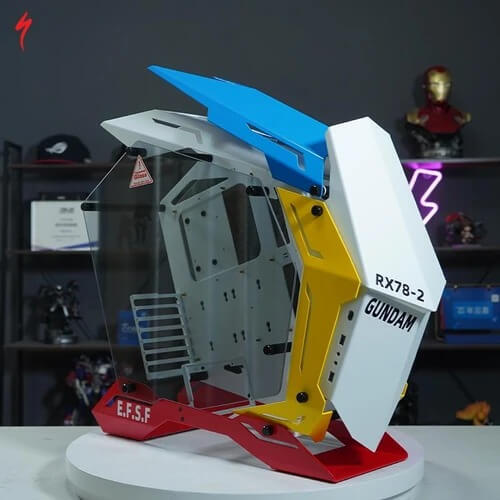
Why Build a Gaming PC Around a Gundam PC Case?
The PC case is normally one of the largest visible components of a desktop setup.
That makes it a natural starting point for a themed build.
With a Gundam setup, you can use the case as the centerpiece and then choose the keyboard, mouse, audio equipment, lighting and desk accessories around it.
This approach can also keep the setup cleaner. You don't necessarily need every accessory to carry Gundam branding.
A strong Gundam case combined with carefully selected neutral components can already create a recognizable theme.
Collectors can explore Panda Wagon's Gundam collection for other Gundam technology and accessories that can complement the build.
Gundam Themed Jonsbo MOD 3
The Gundam Themed PC Case Jonsbo MOD 3 is one of the more flexible Gundam choices because Panda Wagon currently lists several design variants.
These include:
- XXXG-01W Wing Gundam
- RX-78-2 Gundam
- RX-0 Unicorn Gundam
- RX-0 Unicorn Gundam 02 Banshee
- MSN-04 Sazabi
That variety is useful for collectors who already have a favorite Mobile Suit or want to coordinate the case with the colors of an existing collection.
The MOD 3 uses an open, aggressive mecha-inspired chassis rather than the traditional rectangular tower appearance.
According to the current Panda Wagon listing, it supports EATX, ATX, MATX and ITX motherboards. It also supports graphics cards up to 400 mm, CPU coolers up to 170 mm, up to six 120 mm fans and 240/360 mm liquid cooling.
These specifications matter because a collector case still needs to accommodate the hardware you actually want to install.
Who Should Consider the MOD 3?
The MOD 3 may make sense for somebody who:
- wants several Gundam design choices;
- prefers a dramatic open-frame/mecha appearance;
- plans to make the PC a major display piece;
- needs support for different motherboard sizes;
- wants room for a large graphics card;
- is building around a specific Gundam or color theme.
The biggest advantage from a collector perspective is probably the choice of Gundam variants.
Instead of forcing every Gundam collector into one visual design, it gives you several starting points.
RX-0 Unicorn Gundam Jonsbo MOD 5
The RX-0 Unicorn Gundam PC Case Jonsbo MOD 5 takes a more specific approach.
Rather than offering several Gundam themes under one listing, it focuses on the recognizable RX-0 Unicorn Gundam aesthetic.
Panda Wagon currently lists the MOD 5 in its gaming PC Case collection alongside the MOD 3.
This makes the MOD 5 particularly interesting for someone who specifically wants an RX-0 Unicorn build rather than a more general Gundam-themed PC.
Its angular chassis and collector styling can become the central visual element of the setup.
If you already collect RX-0 Unicorn products, choosing a case around the same Mobile Suit can also make it easier to maintain a consistent theme across the desk.
Jonsbo MOD 3 vs MOD 5: What Is the Main Difference for a Collector?
The decision should not simply be “which one looks better?”
Start with the theme you actually want to build.
|
Consideration |
Jonsbo MOD 3 Gundam |
RX-0 Unicorn Jonsbo MOD 5 |
|
Gundam theme |
Multiple Gundam variants |
RX-0 Unicorn focused |
|
Best for |
Collectors wanting more design choice |
RX-0 Unicorn-focused collectors |
|
Visual direction |
Aggressive mecha/open-frame appearance |
Futuristic RX-0 collector appearance |
|
Build purpose |
Functional themed gaming PC |
Functional themed gaming PC |
|
Before buying |
Check selected variant and hardware compatibility |
Check hardware compatibility and exact listing specifications |
The MOD 3's biggest attraction is choice.
The MOD 5's biggest attraction is its more focused RX-0 Unicorn identity.
Neither should be selected purely from the model number.
The right choice depends on your hardware requirements, preferred Gundam design and how the finished PC will fit with the rest of your setup.
Check Hardware Compatibility Before Choosing the Design
This is one of the most important parts of buying any unusual collector PC case.
The Gundam artwork may attract you first, but your components still need to fit.
Before ordering, check:
Motherboard Size
Confirm whether your motherboard is EATX, ATX, MATX or ITX and compare it with the specifications of the exact case.
The MOD 3 listing currently supports all four of these formats.
Graphics Card Clearance
Modern gaming GPUs can be large.
Panda Wagon lists support for graphics cards up to 400 mm on the MOD 3, but always compare your exact graphics card dimensions with the current product specifications before purchasing.
CPU Cooler Clearance
Large air coolers also need enough vertical clearance.
The current MOD 3 specification lists CPU cooler support up to 170 mm.
Cooling
A visually impressive build still needs sensible airflow.
The MOD 3 supports up to six 120 mm fans and 240/360 mm liquid cooling according to its current listing.
Think about your CPU, GPU and expected heat output before deciding on the cooling configuration.
Power Supply and Storage
Don't forget the less exciting components.
Check PSU dimensions, SSD/HDD support, cable routing and where the components will sit once the system is assembled.
These details can make a major difference during the actual build.
For more themed chassis options, you can also browse Panda Wagon's gaming PC cases collection.
Build Around One Gundam Theme
One mistake with collector gaming setups is trying to use too many themes at once.
If you choose an RX-0 Unicorn case, consider making that the main identity of the build.
You could then use neutral white, black or selected accent colors for components that don't have Gundam collaboration versions.
If you choose the Sazabi MOD 3 design, the supporting color direction could be very different.
The same principle applies to Wing Gundam, RX-78-2 and Banshee builds.
The goal is not necessarily to make every single component Gundam-branded.
The goal is to make the entire setup look intentional.
Should You Choose the MOD 3 or MOD 5?
Start with three questions.
Which Gundam design do you actually collect?
If you specifically want RX-0 Unicorn, the MOD 5 naturally deserves consideration. If you want Wing Gundam, RX-78-2, Banshee, Sazabi or more design flexibility, the MOD 3 gives you additional choices.
Will your hardware fit?
Check the motherboard, GPU, cooling, PSU and storage requirements before making the visual design your final deciding factor.
Is this a display build or primarily a performance build?
It can be both, but knowing your priority helps.
A collector may accept a more unusual chassis because display value matters. Someone frequently changing components may care more about accessibility and practical installation.
Complete the Gundam Gaming Setup
Once the PC case is chosen, build outward slowly.
A themed keyboard or mouse can work well, but adding too many unrelated collector products can make the setup feel crowded.
Panda Wagon's existing Gundam gaming accessories guide covers a wider range of Gundam technology, including audio and portable gaming products.
That broader guide is useful when you want to expand beyond the PC itself.
For this build, however, keep the case as the centerpiece.
What to Check Before Ordering a Gundam PC Case
Before purchasing, check the current product page rather than relying only on photographs or older specifications.
Confirm:
- exact Gundam variant;
- case dimensions;
- motherboard support;
- GPU clearance;
- CPU cooler clearance;
- radiator and fan support;
- PSU compatibility;
- storage support;
- what is included with the case;
- current availability;
- shipping information.
This is especially important for collector hardware because different editions may look similar while having different specifications or included items.
Final Thoughts
A Gundam PC case works best when it is treated as both computer hardware and a collector centerpiece.
The Jonsbo MOD 3 gives Gundam fans several design directions, including Wing Gundam, RX-78-2, Unicorn Gundam, Banshee and Sazabi. The RX-0 Unicorn Jonsbo MOD 5 offers a more focused choice for collectors building specifically around the Unicorn Gundam aesthetic.
Whichever design you prefer, hardware compatibility should come first.
Check the components you plan to use, decide on one clear Gundam theme and then build the rest of the setup around the case.
You can explore the Gundam collection or browse Panda Wagon's gaming PC cases to compare the currently listed options.
FAQs
What is a Gundam PC case?
A Gundam PC case is a computer chassis featuring Gundam-inspired or collaboration styling. It allows the computer itself to become part of a Gundam-themed collector gaming setup.
Does Panda Wagon sell Gundam PC cases?
Yes. Panda Wagon currently lists the RX-0 Unicorn Gundam Jonsbo MOD 5 and Gundam-themed Jonsbo MOD 3 in its PC Case collection.
Which Gundam designs are available for the Jonsbo MOD 3?
The current listing includes Wing Gundam, RX-78-2 Gundam, RX-0 Unicorn Gundam, RX-0 Unicorn Gundam 02 Banshee and MSN-04 Sazabi options.
Does the Gundam Jonsbo MOD 3 support ATX motherboards?
Yes. Panda Wagon's current specifications list EATX, ATX, MATX and ITX motherboard support.
How large a GPU can fit in the Gundam MOD 3?
The current Panda Wagon listing specifies graphics-card support up to 400 mm. Always compare this with the dimensions of your exact GPU before ordering.
Is a Gundam PC case only for display?
No. These are functional PC chassis. However, buyers should evaluate normal PC-building requirements such as component compatibility and cooling in addition to the collector design.