
For Hatsune Miku fans, collecting is no longer limited to figures, posters, albums, or convention merchandise. Hatsune Miku gaming accessories now make it possible to bring Miku’s recognizable teal aesthetic directly into a gaming or PC setup.
From mechanical keyboards and gaming mice to headphones, earbuds, and controllers, Miku-themed technology combines everyday functionality with collector appeal.
But a good collector gaming setup should not be built around appearance alone. The hardware still needs to fit how you play, work, listen to music, and use your desk every day.
This guide looks at the main types of Hatsune Miku gaming gear available to collectors and what you should consider before building a complete Miku-inspired setup.
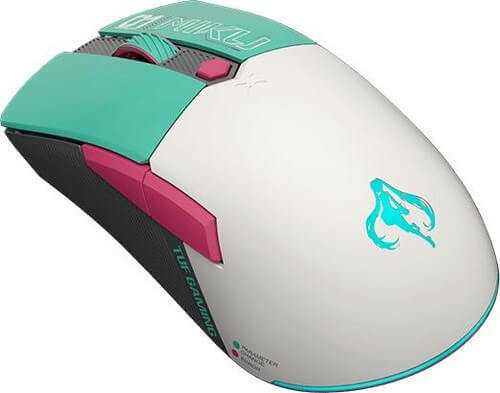
Why Hatsune Miku Works So Well in a Gaming Setup
Hatsune Miku has a visual identity that translates naturally into gaming hardware.
Her familiar teal, white, black, and futuristic digital styling can work particularly well with RGB lighting, modern PC components, mechanical keyboards, and other gaming accessories.
This gives collectors two different reasons to consider Miku collaboration products.
First, they can be functional pieces of gaming technology.
Second, they can become part of the visual identity of the entire desk or gaming room.
Panda Wagon currently carries Hatsune Miku collaborations across several gaming and technology brands, giving collectors options across different product categories rather than just one type of accessory.
Start With One Main Hatsune Miku Gaming Accessory
It can be tempting to buy several collaboration products immediately, but a cleaner approach is to start with one important piece.
A keyboard, mouse, headset, or controller can become the main visual element of the setup.
Once you have that centerpiece, you can decide whether additional Miku accessories will improve the setup or simply make it too busy.
For example, someone building a desktop gaming station may begin with a Miku keyboard and mouse. A music-focused collector may prefer headphones or earbuds first.
The best starting point depends on how you actually use your setup.
Hatsune Miku Gaming Keyboards
A keyboard is one of the most noticeable components on a gaming desk, which makes it a natural choice for a themed build.
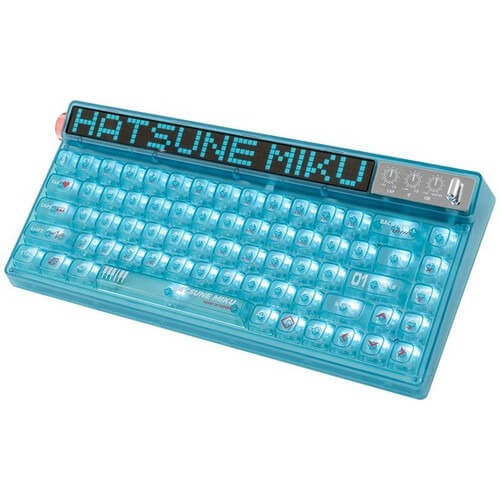
Panda Wagon currently lists the ASUS x Hatsune Miku TUF Gaming K3 Gen II RGB Mechanical Keyboard, part of ASUS's TUF Gaming x Hatsune Miku collaboration.
Another option is the Moeyu x Machenike x Hatsune Miku Heart of Esports 68-Key RGB Wireless Mechanical Gaming Keyboard. The product listing includes RGB lighting and wireless functionality, giving collectors another style of Miku keyboard to consider.
When choosing a Miku keyboard, look beyond the artwork.
Consider:
- Keyboard size and layout
- Wired or wireless connectivity
- Switch/key feel
- RGB lighting
- Desk space
- Compatibility with the rest of your setup
A beautiful limited-edition keyboard is much more useful when it also matches your normal gaming or working habits.
Hatsune Miku Gaming Mice
A gaming mouse is an easier way to introduce Miku styling without changing the entire desk.
Panda Wagon currently carries the ASUS x Hatsune Miku TUF Gaming Mini Wireless Mouse, giving collectors an option that combines Miku branding with a compact wireless gaming design.
There is also a Moeyu x Machenike x Hatsune Miku Heart of Esports Gaming Mouse. Panda Wagon lists this model with a 74g design, PAW3395 sensor, up to 26,000 DPI, wired and 2.4GHz wireless modes, and RGB lighting.
For a gaming mouse, pay attention to:
- Shape and grip
- Weight
- Sensor
- DPI range
- Wired/wireless options
- Battery life
- Button layout
Collectors sometimes focus first on the character artwork, but comfort and performance matter if the mouse will actually be used every day.
Hatsune Miku Headphones and Headsets
Audio is another strong category for Miku collectors.
One visually distinctive option on Panda Wagon is the YOWU Hatsune Miku NX Cat Ear Bluetooth Wireless Headphones, which combines Miku styling with a cat-ear headphone design.
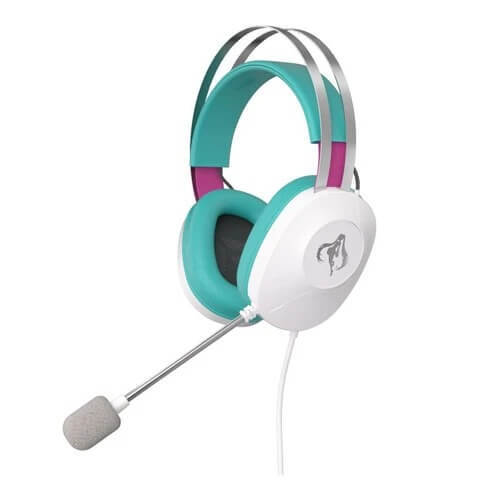
For a more traditional gaming design, Panda Wagon also lists the ASUS x Hatsune Miku TUF Gaming H1 Gen II Wired 7.1 Surround Headset.
There is also a Moeyu x Machenike x Hatsune Miku Heart of Esports Headset for collectors interested in matching the Machenike keyboard and mouse collection.
When choosing headphones or a gaming headset, consider whether your priority is:
- Gaming communication
- Music
- Wireless convenience
- Comfort for long sessions
- Surround sound
- Display/collector appearance
This helps prevent choosing a headset based only on design.
Hatsune Miku Earbuds for Everyday Use
Not every Miku product needs to stay on a gaming desk.
Panda Wagon currently lists several Miku-themed earbuds, including BilibiliGoods x Hatsune Miku Cube Face LCD Screen Wireless Bluetooth Earbuds and Sennheiser x Hatsune Miku Edition MOMENTUM 4 True Wireless Bluetooth Earbuds.
The site also currently lists MOONDROP MIRAGE × Hatsune Miku True Wireless Earphones Special Edition Gift Box, giving collectors another audio-focused option.
Earbuds make sense for collectors who want something they can use outside their gaming room.
They can bring the IP into commuting, travel, work, or everyday listening while still functioning as part of a Miku collection.
Hatsune Miku Gaming Controllers
Keyboard and mouse users are not the only gamers with Miku collaboration options.
Panda Wagon also lists the Beitong x Hatsune Miku Limited Edition BTP-T6 Zeus Custom Button Gamepad Controller, designed for use with PC, PlayStation 4, and Nintendo Switch systems according to the product listing.
A controller can be especially useful for someone who plays different types of games or prefers a gamepad for certain titles.
Before choosing one, check platform compatibility, connection method, button layout, and whether the controller suits the games you normally play.
How to Build a Clean Hatsune Miku Gaming Setup
A good themed setup does not require every item to have Hatsune Miku artwork.
In fact, using too many collaboration products at once can make the desk look crowded.
A cleaner approach is:
- Choose a centerpiece.
Start with the keyboard, headset, controller, or another visually strong product. - Add one supporting peripheral.
For example, pair a Miku keyboard with a matching mouse. - Coordinate the lighting.
Teal, cyan, white, or soft RGB lighting can complement Miku-inspired hardware. - Keep some neutral components.
Black, white, or gray desk accessories can help the special-edition pieces stand out. - Leave display space.
Collector products usually look better when they have room around them.
The goal is not to put Miku branding on every object. It is to make the collaboration products feel intentional.
ASUS TUF Gaming x Hatsune Miku Setup
For collectors who prefer matching products from the same collaboration, ASUS is particularly interesting.
Panda Wagon currently lists products from the ASUS TUF Gaming x Hatsune Miku lineup including a keyboard, wireless mouse, and gaming headset.
Using products from the same collaboration can create a more consistent visual style than mixing several unrelated designs.
This may appeal to collectors who want the desk to look like one complete themed setup rather than a collection of individual Miku products.
Machenike x Hatsune Miku Setup
Another possible direction is the Machenike collaboration.
Panda Wagon currently carries Miku-themed Machenike products including a mechanical gaming keyboard, gaming mouse, and headset.
This makes it possible to build a coordinated keyboard-mouse-headset combination around the same collaboration.
For collectors, that consistency can be just as important as the individual specifications.
Performance vs Collector Value
One of the biggest questions with IP-based gaming technology is whether you are buying it to use or to collect.
There is no wrong answer.
Some buyers want a limited-edition item mainly because they love Hatsune Miku. Others want gaming equipment they can use every day while still expressing that interest.
The strongest purchase is usually where both goals meet.
Before buying, ask:
- Will I actually use this product?
- Does it work with my existing hardware?
- Do I like this specific collaboration design?
- Is the product comfortable and practical?
- Am I buying it because I genuinely want it, or only because it appears limited?
These questions are especially useful when collector products cost more than standard versions.
Mixing Hatsune Miku With Other Anime and Gaming IPs
A collector gaming setup does not need to focus on only one franchise.
Panda Wagon carries collaboration products across multiple popular IPs, including Pokémon, Evangelion, Genshin Impact, Harry Potter, and Hatsune Miku.
A multi-IP setup can work if you keep some visual consistency.
For example, choose products with complementary colors or separate different franchises into different parts of the room.
This lets the setup represent your broader collection without becoming visually confusing.
Where to Find Hatsune Miku Gaming Accessories
Panda Wagon has a dedicated Hatsune Miku collection covering multiple types of collaboration technology.
Collectors can explore Miku gaming mice, mechanical keyboards, controllers, headsets, earbuds, and other themed products from different brands.
When comparing products, check the individual product page carefully for specifications, compatibility, availability, and edition information.
Final Thoughts
Hatsune Miku gaming accessories offer an interesting way to combine fandom with technology that can actually become part of your everyday setup.
A Miku mechanical keyboard can become the centerpiece of a gaming desk. A wireless mouse can add the theme more subtly. Headphones, earbuds, and controllers can extend the collection beyond the desktop.
But design should work together with functionality.
Choose products that match your actual gaming or listening needs, build the setup gradually, and allow the special-edition pieces to stand out.
The result can be a setup that feels unmistakably Hatsune Miku while still working like a proper gaming environment.
Frequently Asked Questions
What are Hatsune Miku gaming accessories?
They are gaming or technology products featuring Hatsune Miku collaboration designs. Examples include gaming keyboards, mice, headsets, earbuds, and controllers.
Are there Hatsune Miku gaming keyboards?
Yes. Panda Wagon currently lists Miku-themed mechanical gaming keyboards from ASUS and Machenike.
Is there a Hatsune Miku gaming mouse?
Yes. Current Panda Wagon listings include an ASUS TUF Gaming x Hatsune Miku wireless mouse and a Machenike x Hatsune Miku gaming mouse.
Can I build a full Hatsune Miku gaming setup?
Yes. A setup can combine a Miku keyboard, mouse, headset, controller, or audio accessories. You can also mix Miku products with neutral hardware to keep the setup clean.
Are there Hatsune Miku headphones?
Yes. Panda Wagon currently lists several options, including YOWU Miku cat-ear headphones, ASUS TUF Gaming x Miku headset, and Machenike collaboration headset.
Are Hatsune Miku earbuds available?
Yes. Current listings include BilibiliGoods, Sennheiser, and MOONDROP Miku-themed wireless earbuds/earphones.
Is there a Hatsune Miku gaming controller?
Yes. Panda Wagon currently lists the Beitong x Hatsune Miku BTP-T6 Zeus limited-edition gamepad controller.
Should I buy matching Miku accessories?
You do not have to. Matching products can create a cleaner theme, but one or two Miku pieces can also work well with ordinary gaming hardware.
What should I check before buying limited-edition gaming gear?
Check compatibility, specifications, connectivity, comfort, availability, and whether the product fits your normal gaming or everyday use.
Where can I browse Hatsune Miku gaming gear?
https://panda-wagon.com/products/collaborations-co-branding/hatsune-miku/